Where is my AIMA case? The official tracker almost nobody knows about
AIMA has a page that shows your case stage by stage: the decision, the card in production, dispatch with a CTT tracking code, delivery. It is not on the website and needs no account — the link arrives by e-mail after a five-minute form. That is how we found out our application had been approved four and a half months earlier.
Go to the stepsWhat it gives you
The decision before anything else
Our case was approved on 5 March. The Portal de Renovações kept saying «Em Avaliação» until 8 September. The tracker showed the approval the day we opened it.
The card on its way
When the card is dispatched, the CTT tracking code appears. You can follow the letter to your mailbox.
Dated proof
A screenshot of the tracker with its date is a document: it served us in letters to AIMA.
No account, no password
Just your e-mail, passport and residence permit number. No registration, no Chave Móvel, no card reader.
What the tracker does not do
- It does not answer questions: the form that gives you the link is not a complaints channel. Nobody ever replied to our questions there.
- It speeds nothing up. It shows the state; it does not change it.
- It is not always available: some days the page will not open and the form «cannot find» the case. It comes back the next day.
- It does not replace the Portal de Renovações for submitting or paying — only for seeing where things stand.
Don't let the form scare you
Fill in only what is asked: subject type, subtype, e-mail, then seven personal details. Nothing else. Do not look for «what else to add», do not invent, do not attach anything. A field you do not know — leave blank and submit: if it is mandatory, the form will say so.
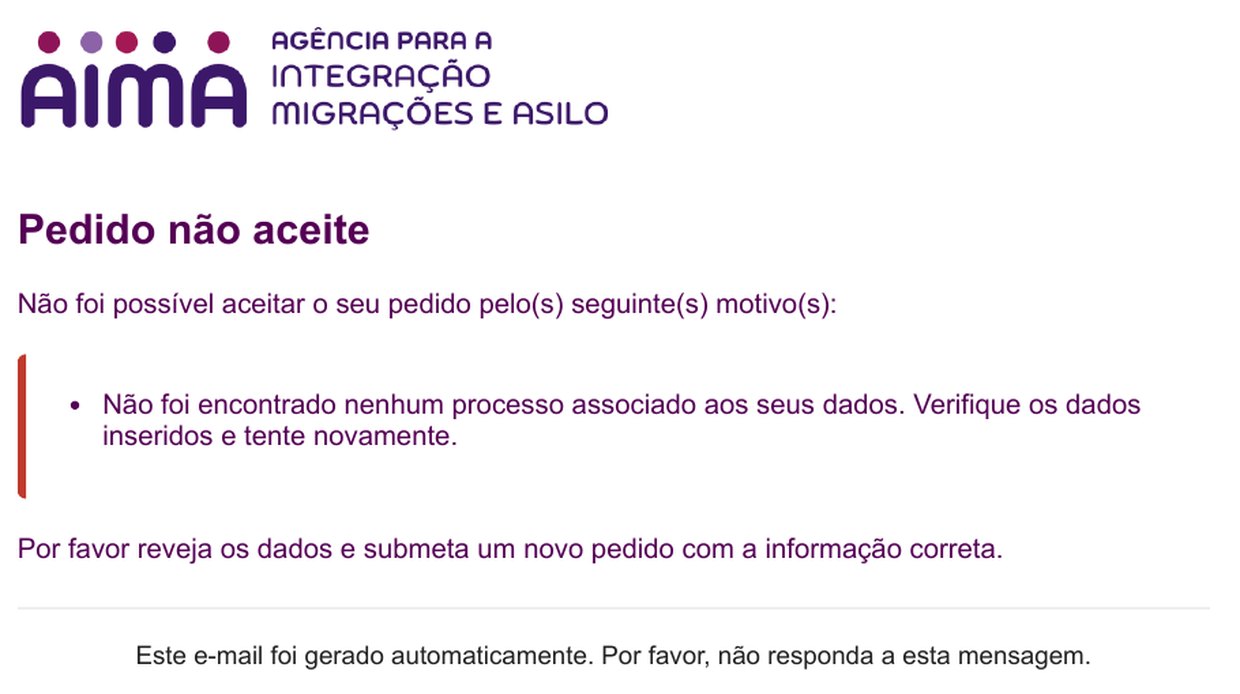
If you get «Pedido não aceite — no case found», most of the time it is not your mistake: the system was down. It happened to us on 12 August; on the 13th the same form went through. See «If the tracker fails».
What you will need
- An e-mail you can open right now: the confirmation code and the link arrive there.
- Your passport number.
- Your residence permit number (field «N.º AR / TR»): nine characters, like 09S843T60, printed on the card. It also appears in the Portal de Renovações as «Título Residência». If the card has expired, the number is still that one.
- Five minutes. Works on a phone.
Open the contact form
At contactenos.aima.gov.pt. The first screen has two lists and an e-mail field. In the lists, type «Consulta» to find the entries quickly.
Open the AIMA form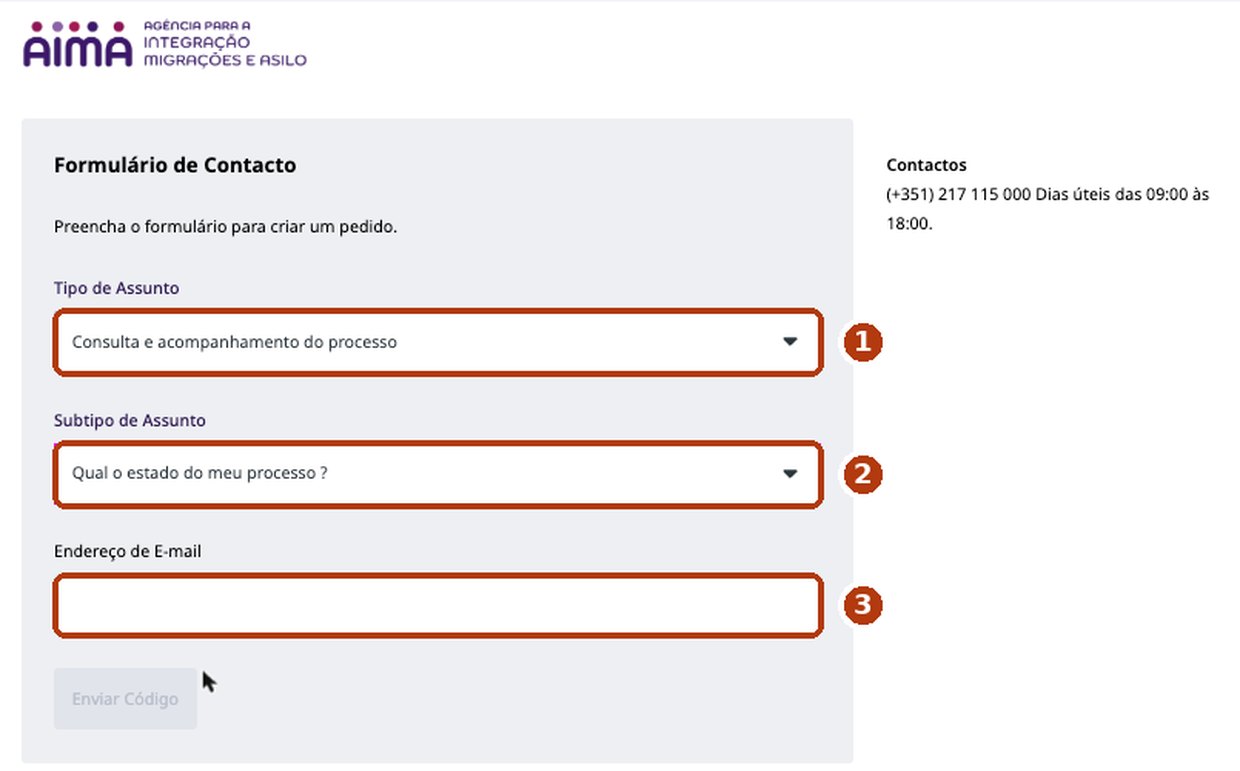
- «Tipo de Assunto» → Consulta e acompanhamento do processo.
- «Subtipo de Assunto» → Qual o estado do meu processo ?
- Your e-mail → «Enviar Código».
Confirm your e-mail with the code
An e-mail «Contactenos AIMA Validação de E-mail» arrives with a code. Type it into the form. Only then do the personal-data fields appear.
The code can take a while. A few minutes in our case; once we had to request a second one. Check your spam folder before asking again.
Fill in the seven fields and submit
Full name as in your passport, date of birth, nationality, e-mail, phone, passport number, residence permit number («N.º AR / TR»). Tick the personal-data declaration. No attachments. Submit.
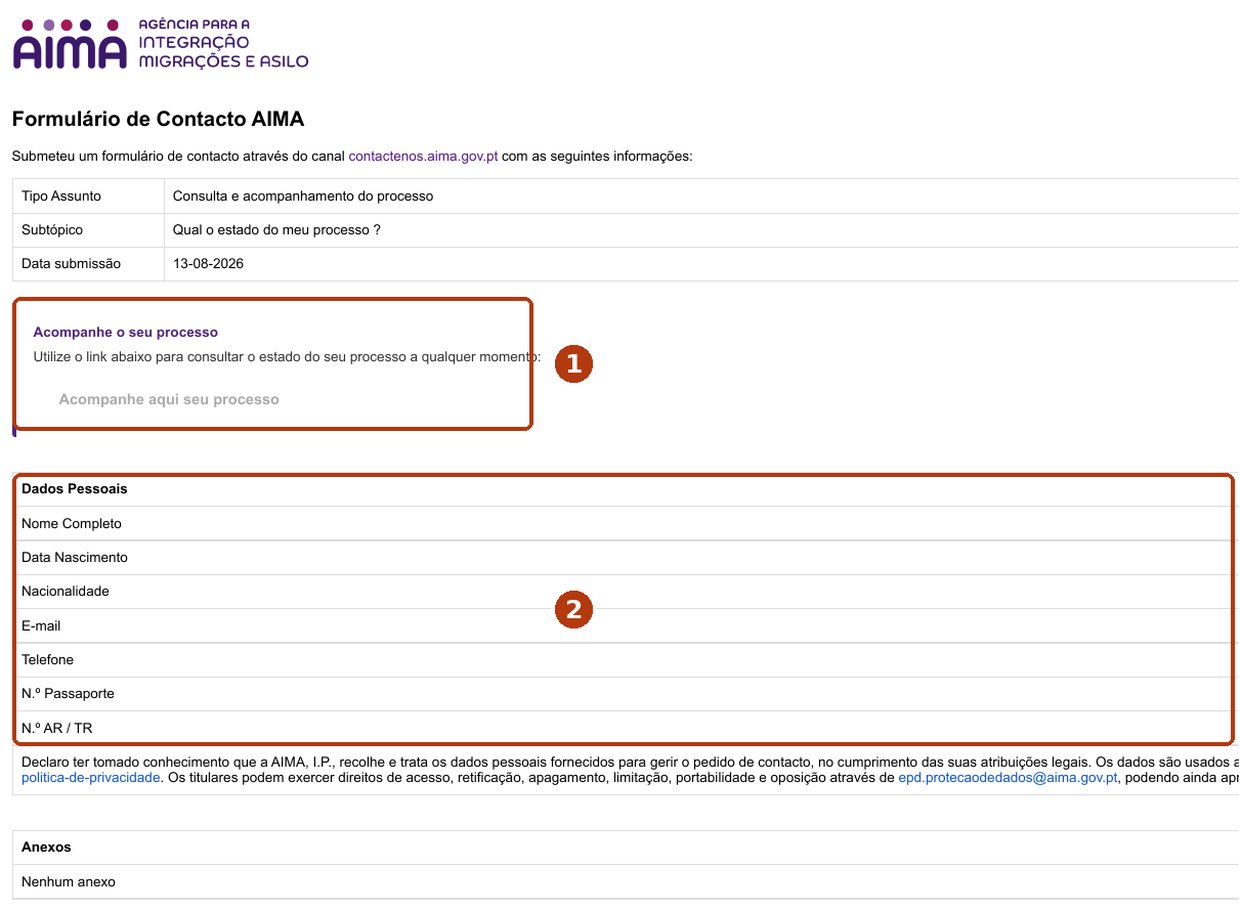
- This is what you receive next: the e-mail «Formulário de contacto AIMA» with the button «Acompanhe aqui seu processo». The button is the tracker.
- The list of fields the form has — and only these. The image is from our own e-mail, with the data removed.
The name must match the case. If AIMA has your name in one spelling and your new passport in another, use the one on the residence permit.
Save the link
The e-mail arrives within minutes. The button opens contactenos.aima.gov.pt/tracking/… with a long code at the end: that is your personal link. Bookmark it or keep it in your notes — it is permanent, you can open it every day without repeating the form. Every new form gives a new link; the old one keeps working.
Read the tracker
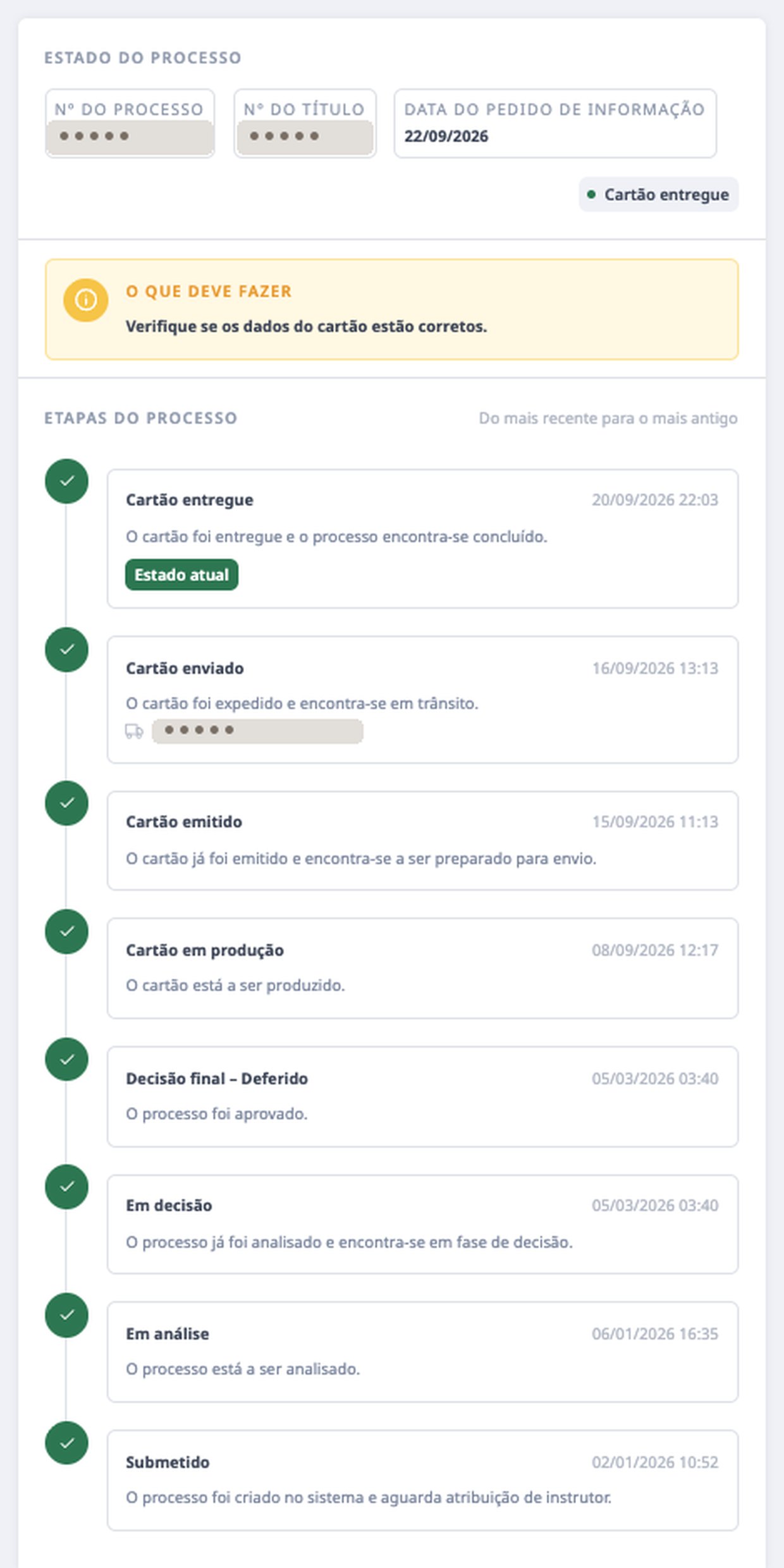
The page has three blocks: the current state, «what you should do» and the stages, newest first. Grey stages marked «A aguardar» have not happened yet.
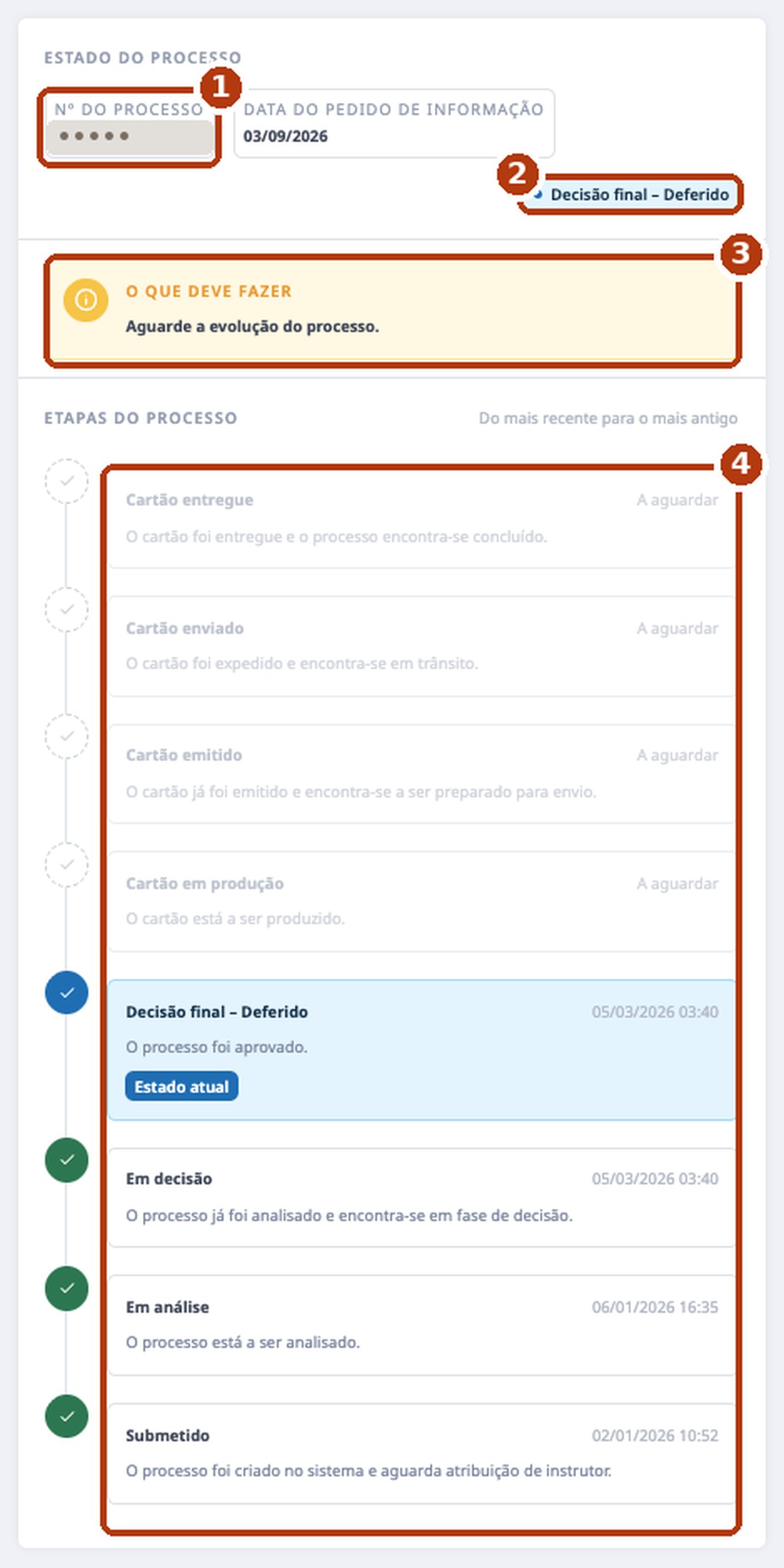
- Case number — only the last characters of your permit number. That is how the tracker finds the case.
- Current state. Here: «Decisão final – Deferido», i.e. approved.
- «O que deve fazer» — what to do. For months it only said «Aguarde a evolução do processo» (wait). When the card is dispatched, the CTT code appears here.
- The eight stages. Green ones have happened, with date and time; blue is the current one; grey ones are still to come.
| Submetido | The application is in the system, waiting for a case officer. |
|---|---|
| Em análise | Someone is looking at the case. For us, four days after submission. |
| Em decisão | Reviewed; the decision is pending. For us it changed in the same minute as the next one. |
| Decisão final | «Deferido» — approved. «Indeferido» would be refused. From here on the receipt keeps acting as your permit (Law 23/2007, art. 78(7)). |
| Cartão em produção | The card is being manufactured. In our case this started six months after the decision. |
| Cartão emitido | Manufactured, being prepared for dispatch. One day after the previous stage. |
| Cartão enviado | Sent by CTT; the tracking code appears. The next day. |
| Cartão entregue | Delivered. The tracker marked it two days after the letter was in the mailbox. |
Follow the card to your mailbox
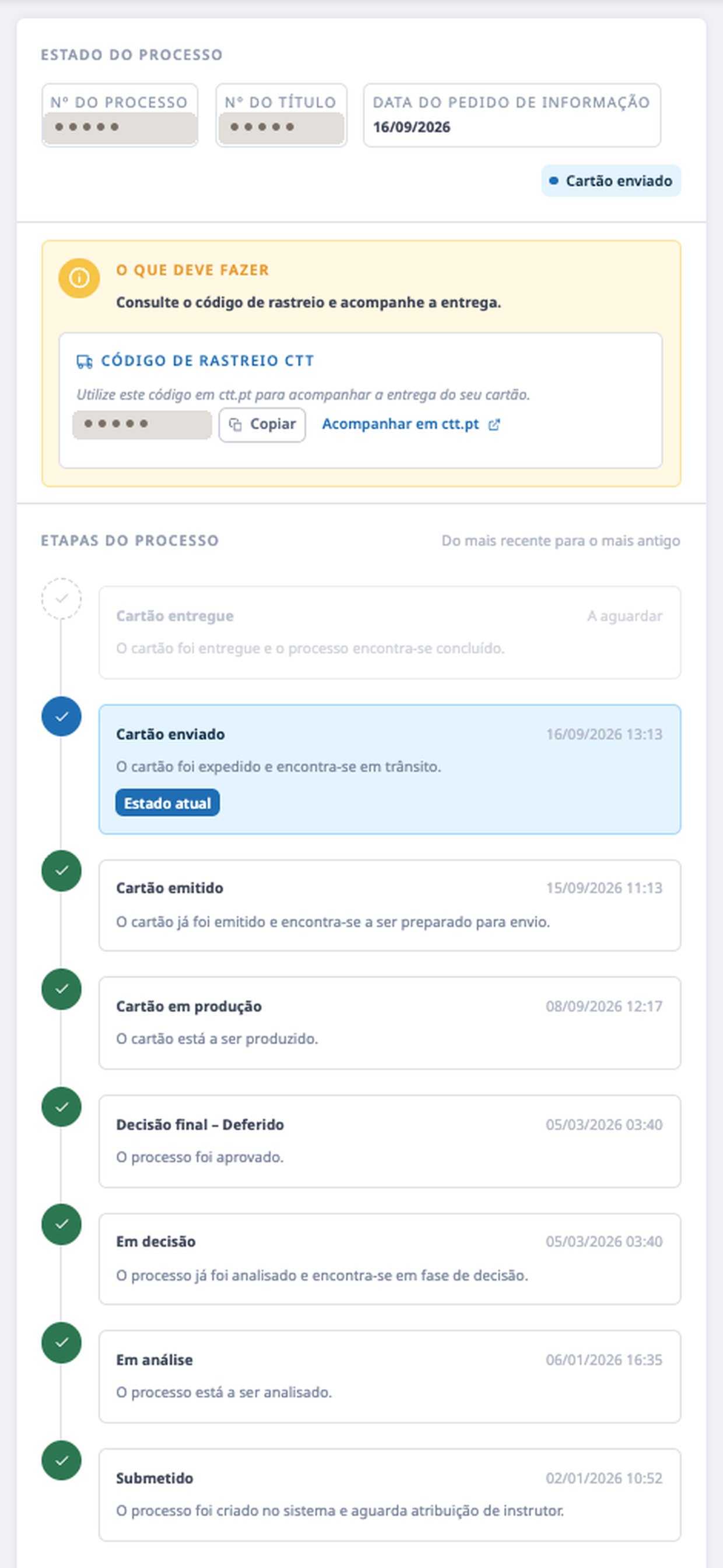
From «Cartão enviado» the yellow block shows the CTT code with «Copiar» and «Acompanhar em ctt.pt». The letter is registered: if you are not at home, it waits at the CTT post office. From «in production» to «delivered» took twelve days.
What about the Portal de Renovações?
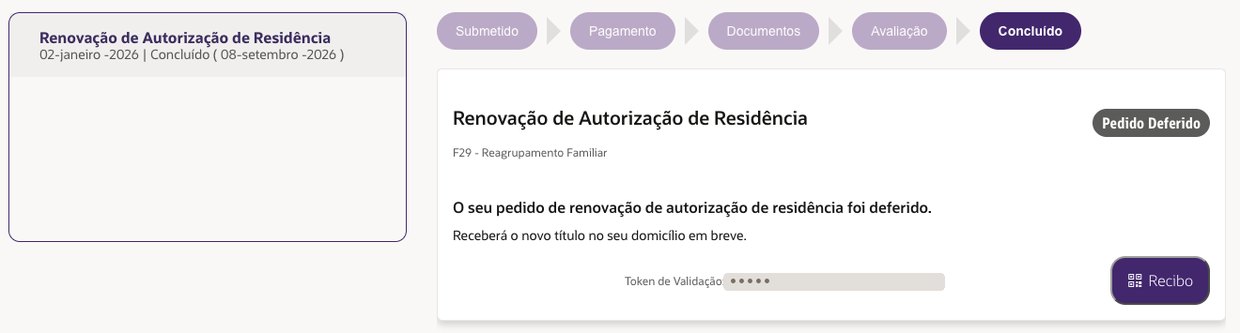
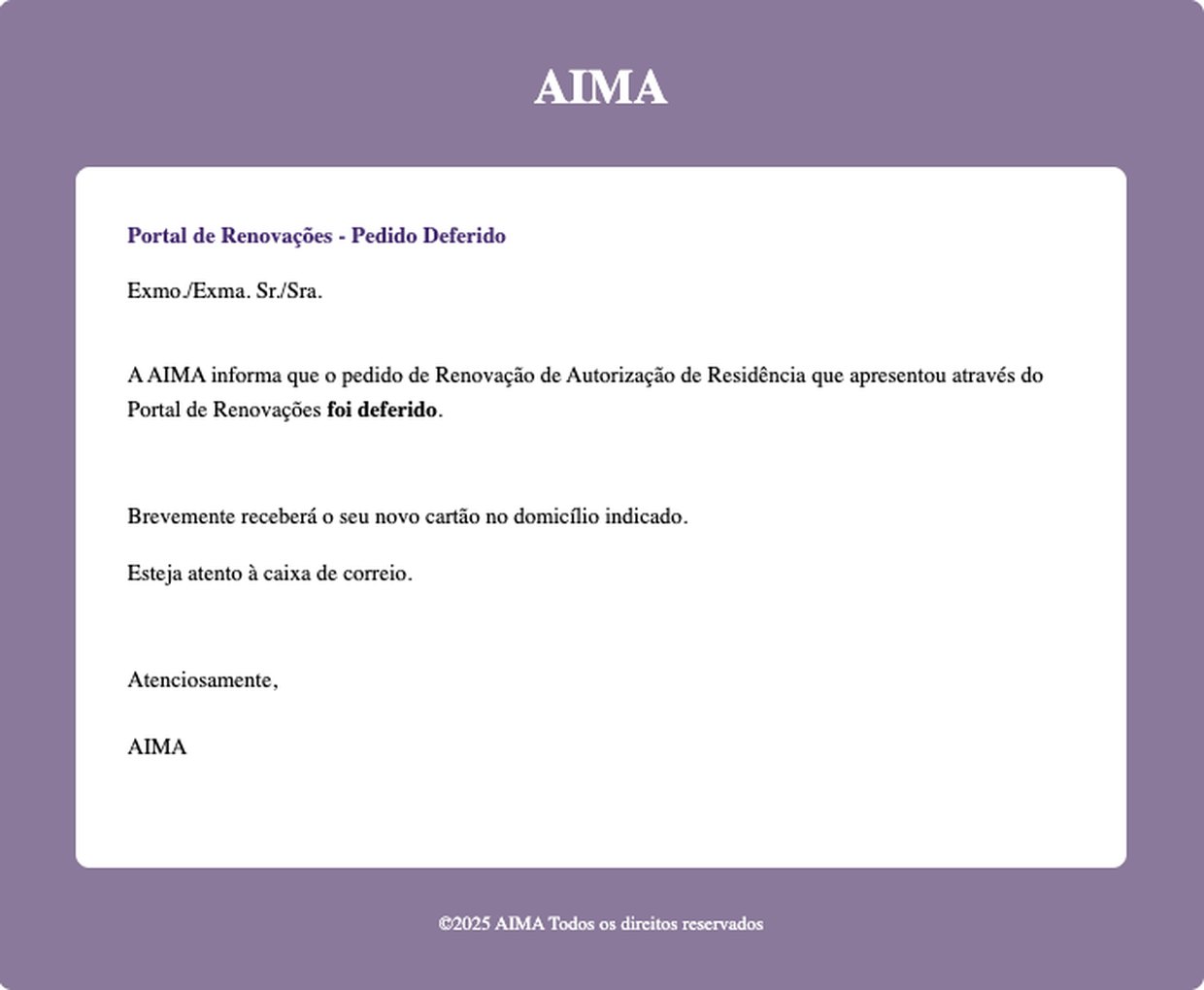
It is a different system, and it lags. We submitted the renewal there on 2 January; the decision came on 5 March; the portal showed «Em Avaliação» until 8 September, when it jumped straight to «Concluído» and «Pedido Deferido» — the same day the tracker marked «Cartão em produção». The «Pedido Deferido» e-mail arrived that day too. Rule of thumb: tracker first; portal to confirm.
If the tracker fails
It happens. On 12 August the link would not open, the portal said «Em Avaliação» and the form replied «Pedido não aceite»: no case matching the data. We had changed nothing. On the morning of 13 August the same form went through and the tracker was back. What we do since then:
- Try in the morning. AIMA's systems restart around 4 a.m.; afternoons and evenings fail more often.
- If the link will not open, repeat the form: you get a new link. The old one usually comes back by itself.
- If it «cannot find the case», check the permit number and the name — and try the next day before concluding the mistake is yours.
- Screenshot every check, with the date. If one day you need to write to AIMA, that is your evidence.
Our case, by date
- 02.01.2026Renewal submitted on the Portal de Renovações. Four days later, «Em análise».
- 05.03.2026«Decisão final – Deferido», at 3:40 in the morning. Nobody told us.
- 23.07.2026First contact form; the tracker shows the approval from March. Four and a half months in the dark. The card had still not gone into production.
- 12–13.08.202612th: tracker down, «Pedido não aceite». 13th: everything back.
- 08.09.2026«Cartão em produção». The same day the portal switches to «Concluído» and the «Pedido Deferido» e-mail arrives.
- 15–16.09.2026«Cartão emitido» on the 15th, «Cartão enviado» on the 16th, with a CTT code.
- 18–20.09.2026Registered letter in the mailbox on the 18th. The tracker marked «Cartão entregue» on the 20th.
In short
Where is the «N.º AR / TR»?
It is the residence permit number: nine characters, printed on the card, and shown in the Portal de Renovações as «Título Residência». The tracker shows only the last ones. If you cannot find it, submit without it: if it is mandatory, the form will warn you — we did not test that.
Is the link permanent?
Yes. We used the same link from July to September. A new form gives a new link; the old one does not stop working.
Does it work for any AIMA case?
We tested it with a residence permit renewal. The form is generic — type «Consulta e acompanhamento do processo» — but we do not know how it behaves with other applications. If you try, tell us.
Can I ask questions through the form?
You can, but do not expect an answer. In our four attempts the only result was the tracker link. To talk to a person: 217 115 000, working days.
The tracker says «Deferido» but the card does not come. Now what?
That was our case for six months. It is another story, with other steps — for the next page in this series.
A question, your experience or an idea?
If the tracker showed you something else, the form asked for other fields or you found a shorter way — write to me. I answer myself, and your case (without personal data) goes onto this page to make life easier for the next person.
More on nDm
European Health Insurance Card
Free, three years. When Segurança Social Direta refuses: e-Clic, GIT-53, MG2 and a CMD signature.Madeira Resident Card
Trails at €0 and the Porto Santo subsidy. The SIMplifica application, screen by screen.Mobility Subsidy
How to get part of your Madeira — mainland ticket back. Five portal screens.Who wrote this
Igor Kartuzov, SeedWave. The images are from my 2026 renewal, with the numbers removed; the dates are real. If yours went differently, write to me on LinkedIn — I will update the page.
Sources
- contactenos.aima.gov.pt — Formulário de Contacto · AIMA, I.P.
- services.aima.gov.pt/RAR — Portal de Renovações · AIMA, I.P.
- aima.gov.pt · Centro de Contacto 217 115 000 (dias úteis, 9h–18h)
- Lei n.º 23/2007, artigo 78.º, n.º 7 — o recibo do pedido de renovação produz os efeitos do título até à decisão final