Damos o Caminho›Subsídio de Mobilidade
nDm · Subsídio de Mobilidade
The claim in five steps
The State refunds island residents most of the ticket price. The money lands in your bank account — if you get through five portal screens and correctly copy seven figures from the airline invoice. Here is every screen and every field — and where people lose the money.
Free, no registration. We do not file anything for you — we show you how to file it yourself.
- 5 screens
- 7 figures from the invoice
- ≈ 15 days to the money
What to prepare before you start
The form will not let you go further without these, and you cannot go back and add something mid-claim — the draft loses fields. So gather everything first, then start.
- Two PDFs from TAP: the invoice AIE APXIE026_….pdf (with the Declaração para efeitos de Subsídio de Mobilidade attachment) and the travel proof BoardingProofTAP_….pdf. How to request both — Documentos TAP.
- IBAN and phone number entered in the portal profile, and a Comprovativo do IBAN approved by an operator. If red Rejeitado appeared on your first login — that is not a refusal: First login.
- Chave Móvel Digital or a citizen card with a card reader — there is no other way into the portal.
- If your spouse or children flew with you, they must be added to the profile beforehand: Family.
Whether you are eligible at all — three questions, half a minute. What exactly is refunded and how much — How much money and what for.
Following one real example
Below is a real claim: Funchal → Lisbon → Funchal, TAP, Madeira resident. Approved and paid. Every figure in the steps is taken from its invoice, and we show which line each one comes from.
- Outbound fare · 202.00 − 5.00 discount
- 197.00 €
- Return fare
- 90.00 €
- Passenger fee · YP
- 35.03 €
- Fuel surcharge · YQ
- 115.00 €
- Security fee · PT
- 7.12 €
- Custo
- 444.15 €
- Copagamento
- − 79.00 €
- Reembolso
- 365.15 €
Copagamento of €79 is the share the passenger pays themselves; it is always deducted. Where the other figures come from, and what is never refunded — How much money and what for.
The five wizard screens
The list of steps is visible on the left of the portal. You cannot click through it — you can only go back with the Anterior button, one step at a time. Worth knowing in advance.
Dados Gerais do Beneficiário
The first screen asks nothing. All six fields are grey — name, NIF, postcode, town, email and phone come from Autenticação.gov, and cannot be changed here. There is only one live element.
ssm.gov.pt
On a computer the portal opens in a separate window on the right — the instructions stay on the left. Login only via Chave Móvel Digital or a citizen card. On the portal home page, click Submeter Pedido.
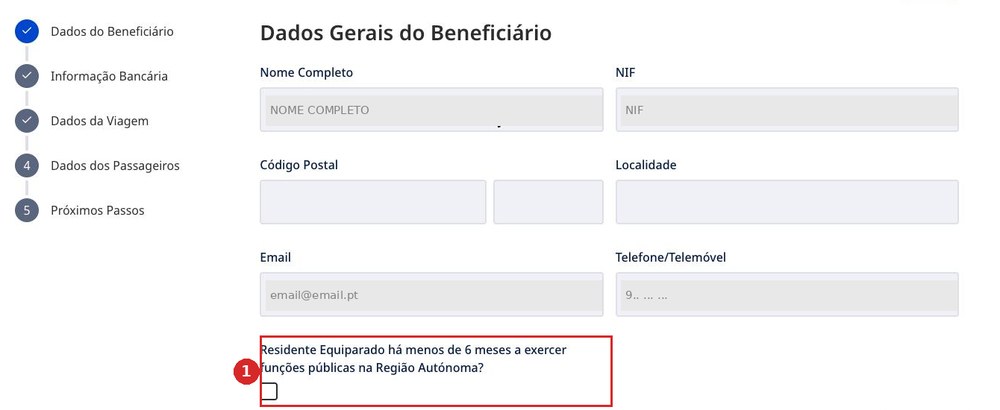
- 1Residente Equiparado há menos de 6 meses a exercer funções públicas na Região Autónoma? — ticked only if you moved to the region less than six months ago and work here in a public-sector role. In every other case, leave it alone.
There is no “back” button on the first step — only Seguinte.
The postcode and town stay blank
Código Postal and Localidade cannot be filled in here or in the personal area — the portal shows the fields but does not let you edit them.
This does not affect eligibility: in our claim the postcode is blank and the status is Validado.
Informação bancária
One field. It too is grey: the portal fills in whatever is in the profile.
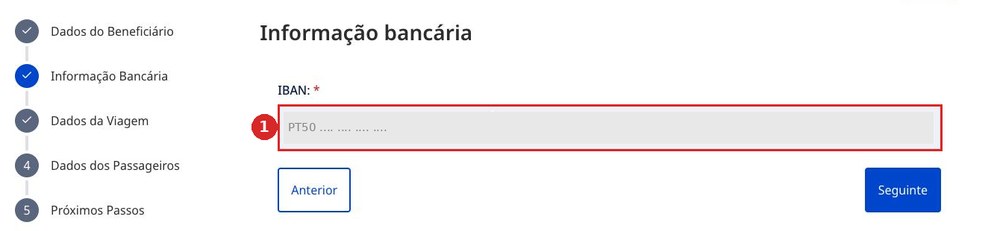
- 1IBAN — read-only. Changed in Área Pessoal → Alterar Dados (what that looks like and how — First login).
Stop if the account is not yours or the field is blank
The money will go to this exact IBAN. Go back to the home page, open Área Pessoal, fix the account — and only then start the claim.
Dados da Viagem
The longest screen. It splits into three parts: the invoice, the route and two files. We go through each part, and show where every figure in the invoice comes from.
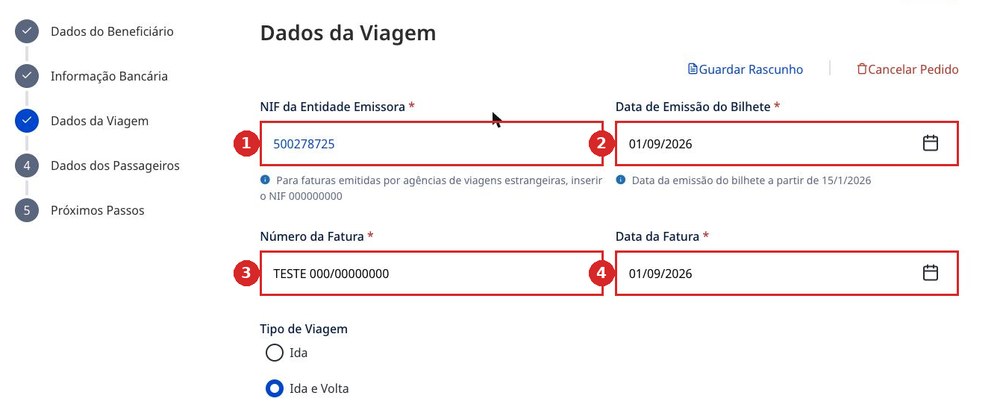
- 1NIF da Entidade Emissora — the tax number of whoever issued the invoice. For TAP this is 500278725. If a foreign travel agency issued the invoice, the portal asks for 000000000.
- 2Data de Emissão do Bilhete — the ticket issue date. The portal warns: not earlier than 15/01/2026.
- 3Número da Fatura — the full invoice number, including the letter prefix: AIE APXIE026/04544710.
- 4Data da Fatura — the date of the invoice itself. Not the ticket issue date, and not the departure date.
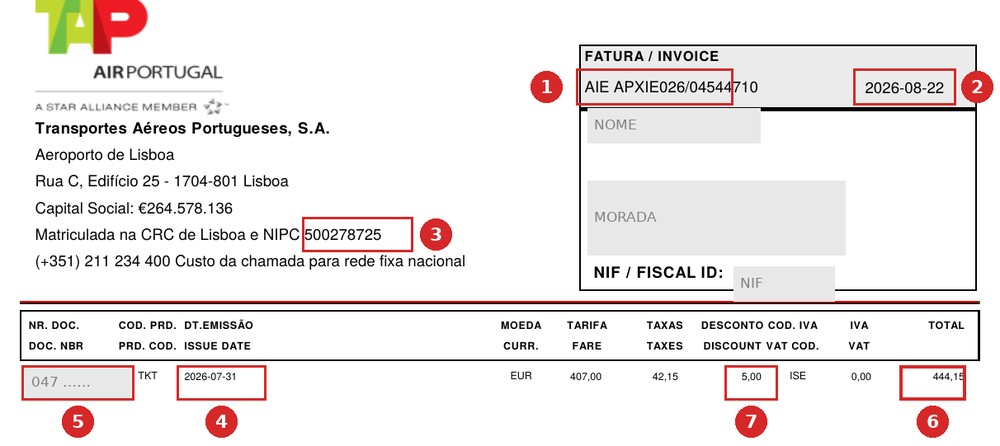
- 1Número da Fatura — the full number, with the letters: AIE APXIE026/04544710.
- 2Data da Fatura — the date to the right of the number. In this example, 2026-08-22.
- 3NIF da Entidade Emissora — 500278725. No need to look it up: it is printed in the invoice header, in the line “Matriculada na CRC de Lisboa e NIPC”.
- 4Data de Emissão do Bilhete — column DT.EMISSÃO. Here 2026-07-31: the ticket was issued on 31 July, and the invoice on 22 August. Different dates, and the portal asks for both.
- 5E-Ticket — column NR. DOC., thirteen digits, starting with 047. Needed at step four.
- 6The TOTAL column is not entered into the portal, but it is what you check against: the Custo the portal calculates itself must match this figure.
- 7The DESCONTO column — if there is a discount here, note it. At step four you will have to subtract it from the fare, or the total will not add up.
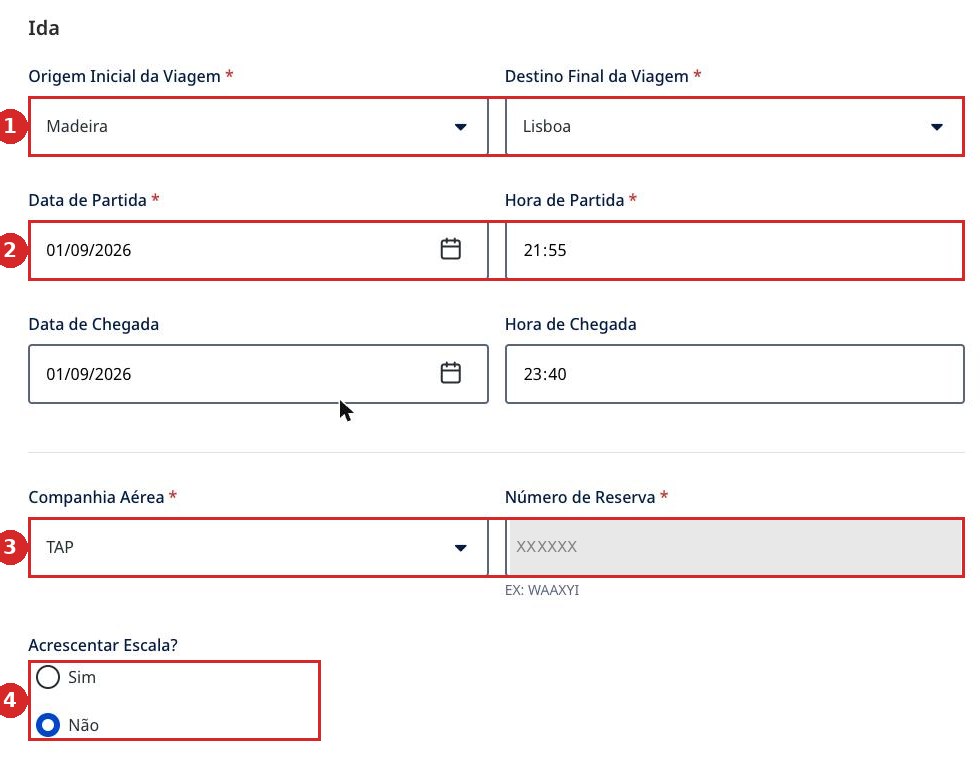
- 1Origem Inicial da Viagem and Destino Final da Viagem — these are regions, not airports: Madeira, Lisboa.
- 2Data de Partida and Hora de Partida are required. Data de Chegada and Hora de Chegada carry no asterisk, but fill them in: the operator checks them against the boarding pass. Dates and times come from the segments on page two of the invoice (shown at step 4).
- 3Companhia Aérea and Número de Reserva — the six-letter booking code, the portal suggests EX: WAAXYI. This is not the ticket number.
- 4Acrescentar Escala? — Sim only if there was a connection within a single ticket.
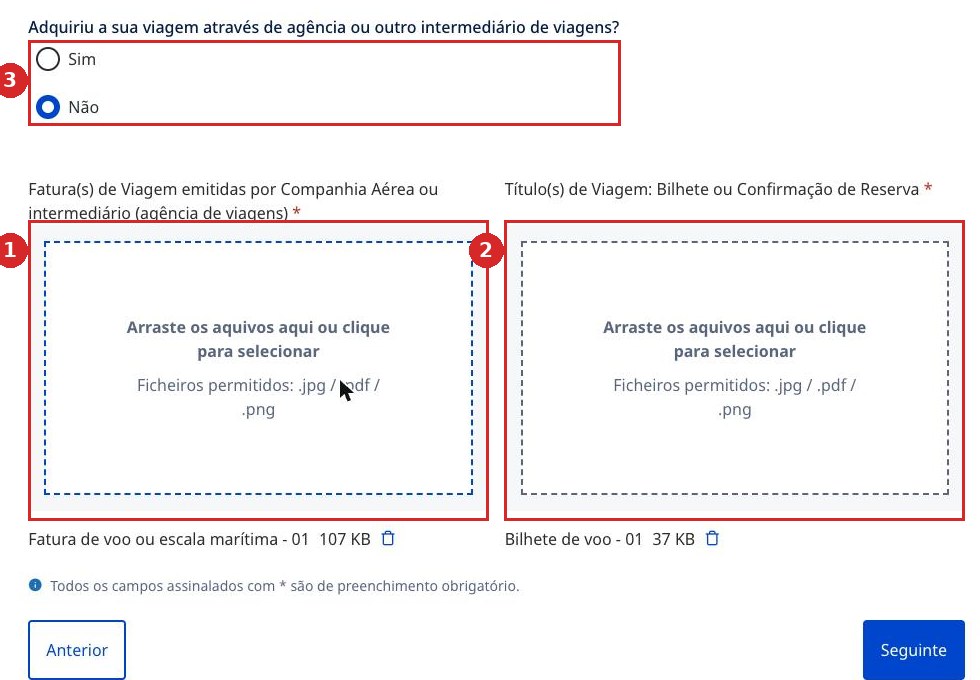
- 1Fatura(s) de Viagem emitidas por Companhia Aérea ou intermediário — this is where the invoice goes: for TAP, the file AIE APXIE026_….pdf.
- 2Título(s) de Viagem: Bilhete ou Confirmação de Reserva — this is where the travel proof goes: BoardingProofTAP_….pdf.
- 3Adquiriu a sua viagem através de agência ou outro intermediário de viagens? — Não if the ticket was bought directly from the airline.
This is what people mix up most
The two documents are not interchangeable. And an extra document is also an error: a real correction notice reads O documento submetido não é necessário — “the attached document is not needed”.
How to request both documents from TAP is shown in Documentos TAP — opens in a new tab.
Dados dos passageiros
This is where the money appears. Seven figures, all seven copied from the invoice — the file AIE APXIE026_….pdf that TAP sends on request (how to request it — Documentos TAP). Which fees are refunded and which are not — How much money and what for.
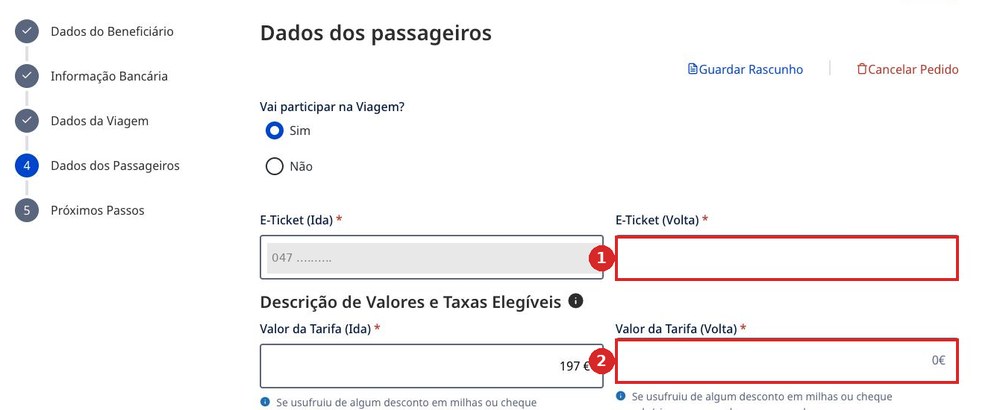
- 1Vai participar na viagem? — must be set to Sim. While it is set to Não, there are no amount fields on the screen at all, and the refund shows as €0.
- 2E-Ticket (Ida) and E-Ticket (Volta) — ticket numbers, thirteen digits, starting with 047 for TAP.
- 3In this screenshot, E-Ticket (Volta) is blank and Valor da Tarifa (Volta) is zero. This is what a draft looks like after being saved and reopened.
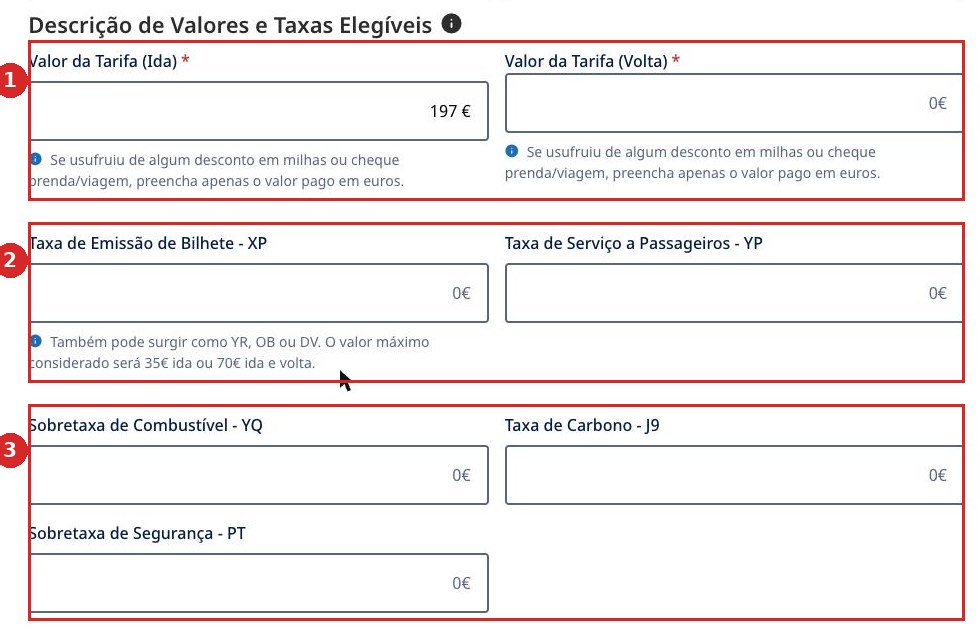
- 1Valor da Tarifa (Ida) and (Volta) — the bare fare, before fees.
- 2Taxa de Emissão de Bilhete - XP — on the invoice it may appear as YR, OB or DV. Capped at €35 one way and €70 return.
- 3Taxa de Serviço a Passageiros - YP, Sobretaxa de Combustível - YQ, Taxa de Carbono - J9 and Sobretaxa de Segurança - PT — copied from the invoice line by line, by code. The fee fields carry no asterisk: they go through blank without an error, and on a normal ticket that is about €157 — over a third of the refund.
- 4Use a comma, not a full stop. Where there is no value, enter 0.
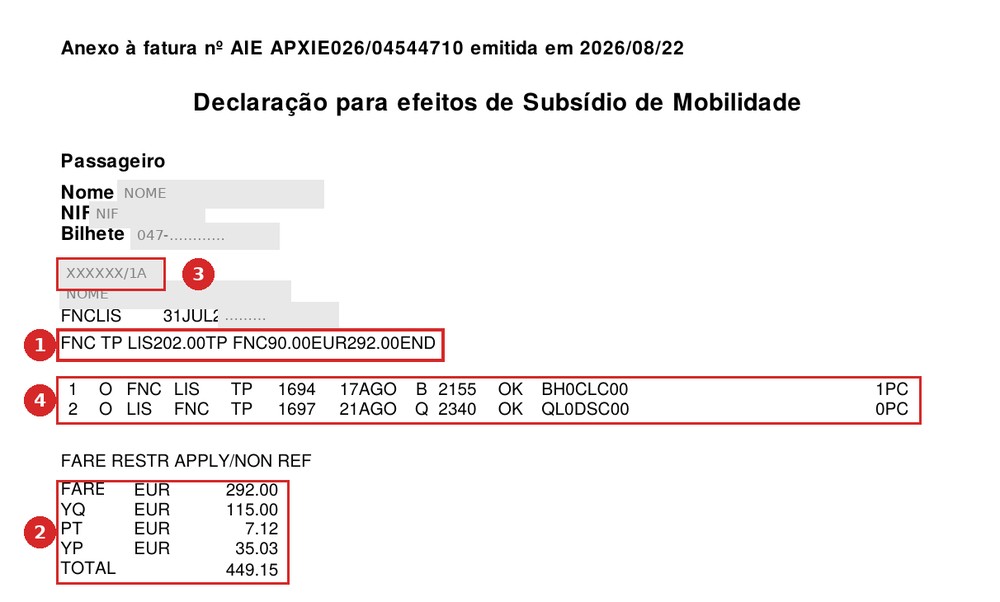
- 1Fare calculation line — the only place in any document where the fare is split into “outbound” and “return”. FNC TP LIS202.00TP FNC90.00EUR292.00END reads left to right: from FNC on flight TP to LIS — 202.00; then flight TP to FNC — 90.00; total 292.00. The first figure goes into Valor da Tarifa (Ida), the second into Valor da Tarifa (Volta).
- 2Fees by code. YQ 115.00 → Sobretaxa de Combustível - YQ; PT 7.12 → Sobretaxa de Segurança - PT; YP 35.03 → Taxa de Serviço a Passageiros - YP. The FARE line is the sum of the fares and is not entered into the portal. If a code is missing from the list, the portal field stays zero.
- 3The Tarifa column on page one of the invoice already includes YQ — that figure is not entered into the fare field, or the fuel surcharge is doubled and the claim is sent back for correction.
- 4XVYV7W/1A — the booking code. The first six characters go into Número de Reserva at step three.
- 5Segments: flight number, date, airports. This is where the departure and arrival dates for step three come from, and it also shows which leg is outbound and which is return.
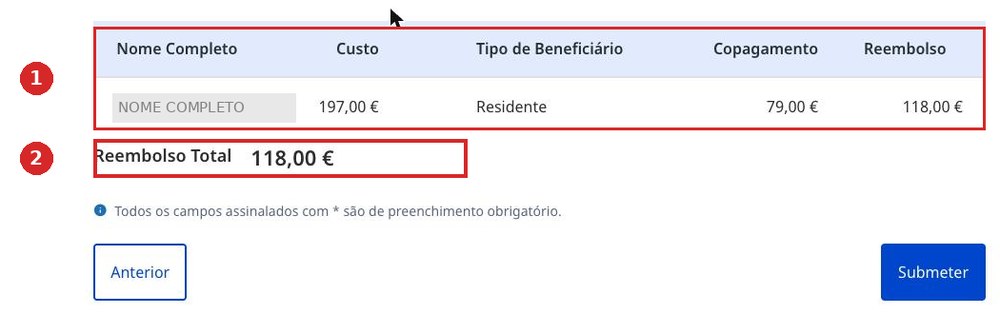
- 1At the bottom the portal adds up Custo, subtracts Copagamento and shows Reembolso Total. If the total looks odd, a field has almost always been missed — the portal is rarely wrong.
Trap: Guardar Rascunho on a return trip
We saved a draft at €208, left and came back — the return leg had vanished: E-Ticket (Volta) blank, Valor da Tarifa (Volta) zero, the total down to €118.
And it was not a display glitch: after leaving, the claims list also showed €118. Fill it in and submit in one sitting.
The discount is deducted from the outbound fare
In our invoice, the fare calculation line gives an outbound fare of 202.00, and page one shows a DESCONTO of 5.00. What went into the portal was 197.00 — that is, 202.00 minus the discount. Custo came out at 444.15, exactly matching the invoice's TOTAL, and the claim was approved.
The check is simple: add up both fares and all the fees. It should come to exactly the TOTAL on page one. If it comes to more, the discount was not deducted.
Próximos Passos
The fifth screen appears only after clicking Submeter. We do not have a screenshot yet — we have not submitted a real claim just for the picture. We will go through it on the next real flight and add it here. To be honest: this step is not shown yet. What happens after submission — below, “How long to wait”.
Summary: where everything sits on the invoice
Short, to keep in view while filling in the form. The invoice is the file AIE APXIE026_….pdf from TAP, two pages; page two is called Declaração para efeitos de Subsídio de Mobilidade. How to request it — Documentos TAP.
| Portal field | Where on the invoice | What to watch for |
|---|---|---|
| Valor da Tarifa (Ida) Valor da Tarifa (Volta) | P. 2, fare calculation line | Two figures in a row: …LIS202.00TP FNC90.00 |
| Taxa de Emissão de Bilhete - XP | P. 2, fees block | May appear as YR, OB or DV. Capped at €35 / €70 |
| Taxa de Serviço a Passageiros - YP | P. 2, YP line | Airport fee per passenger |
| Sobretaxa de Combustível - YQ | P. 2, YQ line | Usually the largest fee |
| Taxa de Carbono - J9 | P. 2, J9 line | Often missing from the list — means zero |
| Sobretaxa de Segurança - PT | P. 2, PT line | Shown simply as PT on the invoice |
| Número de Reserva | P. 2, above the fare line | Six characters before the slash |
| Número da Fatura | P. 1, top right | With the letters: AIE APXIE026/… |
| Data da Fatura | P. 1, next to the number | Invoice date, not departure date |
| Data de Emissão do Bilhete | P. 1, DT.EMISSÃO column | A different date — when the ticket was issued |
| E-Ticket | P. 1, NR. DOC. column | 13 digits, starting with 047 |
| NIF da Entidade Emissora | P. 1, top left | 500278725 — in the NIPC line |
| Check | P. 1, TOTAL and DESCONTO columns | Sum of all portal fields = TOTAL. Deduct the discount from the outbound fare |
After submitting: how long to wait
The claim goes through a human operator: they open every attached file and approve it separately. That is what takes the time.
| Event | When | What happens |
|---|---|---|
| Submeter Pedido | 0 | The claim is sent |
| Em Análise | immediately | The status changes automatically |
| Aprovar of the documents | from an hour | The operator opens each file separately |
| Aprovado | 2–11 days | The six-month residence criterion is checked |
| Pagamento Efetuado | +2–4 days | The money is sent to the IBAN |
Across three real claims, filing to payment took 15, 12 and 2 days. The spread is wide, and depends on how quickly the operator gets to the last attached file. Track a claim under Histórico de Pedidos on the portal home page.
Statuses
- RascunhoDraft. Not submitted and not looked at by anyone.
- Em AnáliseUnder review.
- Correção SolicitadaA correction is requested. Not a refusal — the claim will be reviewed again.
- AprovadoApproved, the money is queued for payment.
- PagoPaid.
- Compareceu / Não CompareceuA separate check that you actually took the flight. A paid claim can still show Não Verificado — that is normal.
If you receive Correção Solicitada
This is not a refusal. The claim is sent back for correction, then reviewed again. Here is a real notice — and both reasons in it are exactly about what this page covers.
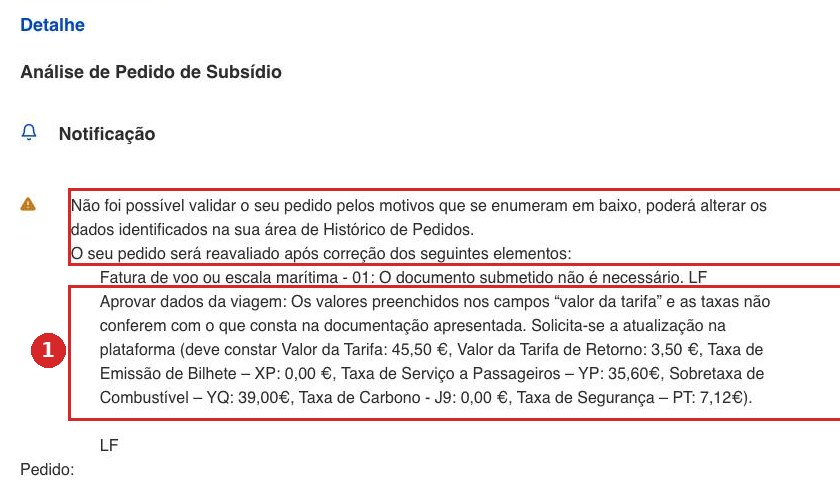
“Your claim could not be confirmed for the reasons listed below. The claim will be reviewed again once the following has been corrected:
— Fatura de voo ou escala marítima - 01: the attached document is not required.
— The values in the fields “valor da tarifa” and the fees do not match the submitted documents. Please update the data on the platform (should be: Valor da Tarifa €45.50, Valor da Tarifa de Retorno €3.50, XP €0.00, YP €35.60, YQ €39.00, J9 €0.00, PT €7.12).”
What to do: open Histórico de Pedidos, go into the claim and correct exactly what is listed. The operator usually writes the correct figures themselves — but the letter arrives two weeks after submission. Easier to copy the figures from the invoice correctly the first time.
Related pages
What this page covers in one line is set out separately elsewhere.
If you get stuck
The only contact on the whole portal is infossm@ctt.pt. No phone, no chat, no feedback form. Write in Portuguese and always include the Número de Pedido.
Since 6 June 2026, Lei n.º 23/2026 has been in force: the subsidy was renamed Mecanismo de Continuidade Territorial, the reimbursement cap was removed, and the portal has not yet been updated to match. What this changes for you — What changed in the law.