How to add family
Done once, in the personal area, before submitting a claim. While the list is empty, family flights cannot be filed — at step four of the wizard their fields simply will not be there.
The Situação Familiar section
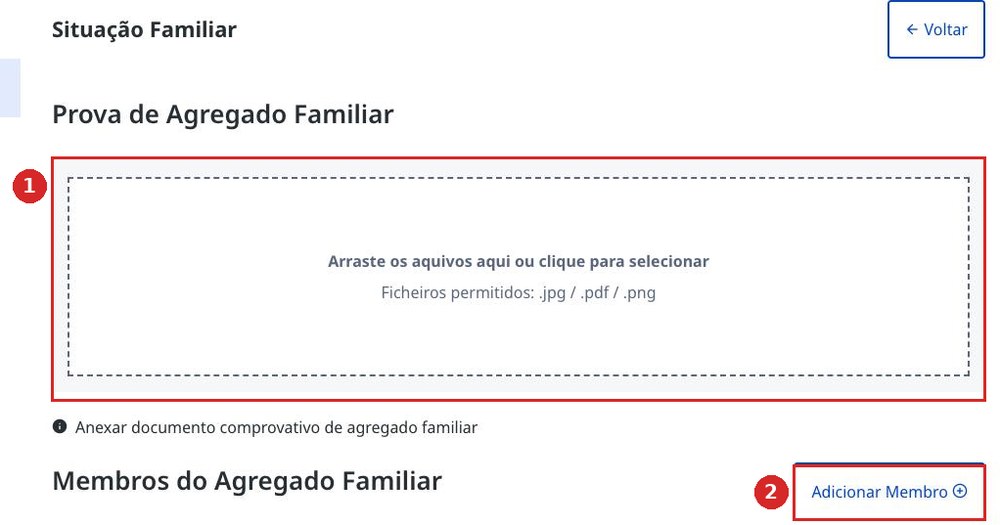
Home page → Aceder à Área Pessoal → Situação Familiar. This is where you upload the Prova de Agregado Familiar — the certificate of household composition — and there is an Adicionar Membro button. This is the only way to get the subsidy for a spouse's or children's flights.
The family member card
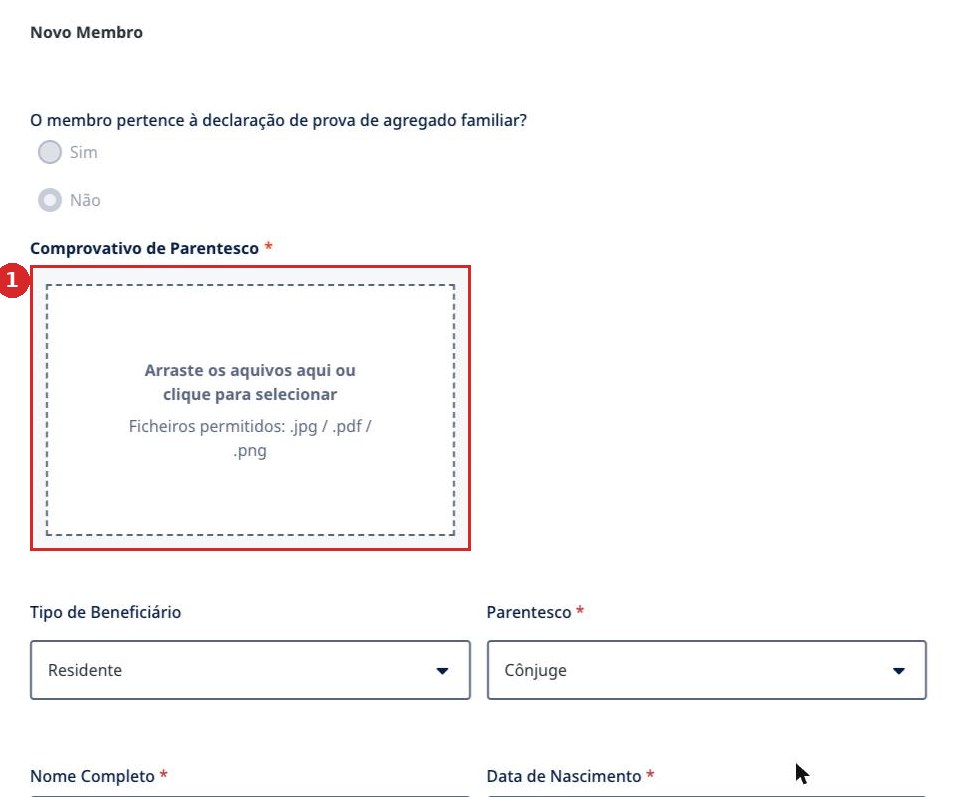
The card lets you pick Parentesco: Cônjuge, Filho or Dependente, and attach the Comprovativo de Parentesco — a marriage or birth certificate. A child's or spouse's beneficiary type can differ from your own: a student, for example, has their own share — €59 instead of €79.
- 1Judging by how the portal checks the Comprovativo do IBAN, family documents are also opened by a human operator — allow a day or two before submitting.
- 2To be honest: we have not yet submitted a family claim. What step four looks like with several passengers, and where the money goes — we will add this after the first real claim.
- 3TAP issues a separate invoice for each passenger. When requesting the documents, choose separate fiscal details so each person has their own file — how this is done is shown in Documentos TAP.
- 4If a spouse or adult child is registered on the portal themselves, it is simpler to file two separate claims — each with their own Chave Móvel Digital.
If you are filing for someone else
Elderly parents, neighbours and acquaintances are often helped this way — and the portal allows it. But one rule matters more than all the others.
The phone and email must be their own
In the profile and in the claim of the person you are helping, their phone number and their email must appear — the same ones used to obtain their Chave Móvel Digital. Not yours.
A real case: a helper entered her own phone number and email into her sister's claim. The sister received the subsidy — but the helper's access to her own account broke, and she is now changing her email through Loja do Cidadão. If a person has no working email, set up a new one for them: twenty minutes now saves months of running around.
- 1Logging into the portal requires only their own Chave Móvel Digital or their own citizen card. The confirmation code goes to their phone, so it is easier to do this together than to leave it for “later, on their own”.
- 2The IBAN — theirs. The money only goes to the account of the subsidy recipient; entering your own to “pass it on later” is not possible.
- 3Everything else in the claim is the same five screens as for yourself: The claim in five steps.