One registration, minute by minute
This is the Histórico do Registo from the personal area. It reads bottom to top.
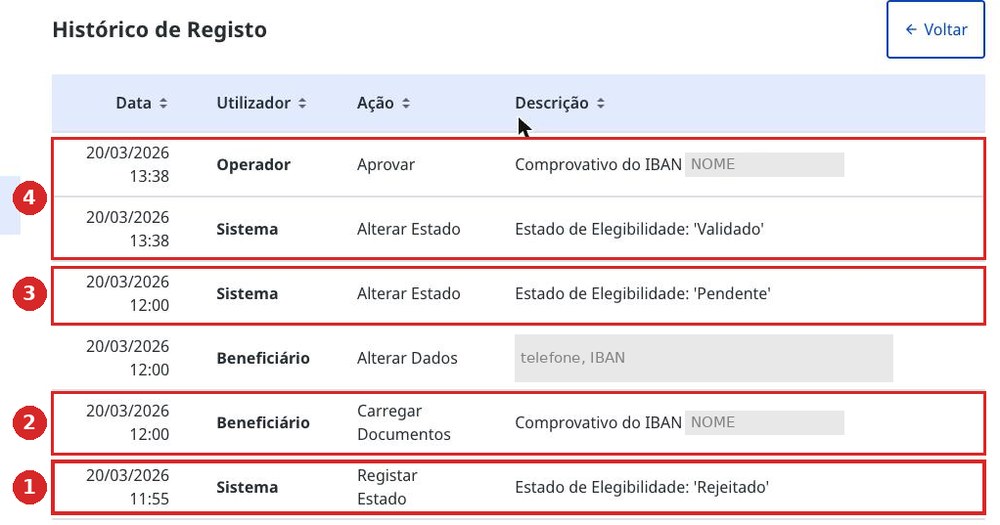
- 1Rejeitado — 11:55. The system created the profile from Autenticação.gov data and immediately set it to refused. The user had done nothing at this point.
- 2The user uploads the Comprovativo do IBAN and enters IBAN and phone number — 12:00.
- 3Pendente — 12:00. The status changes itself, as soon as the profile is complete.
- 4Validado — 13:38. A human operator opened the document, approved it, and the status turned green. An hour and forty-three minutes passed between “refused” and approval.
What to do if you see Rejeitado
Home page → Aceder à Área Pessoal → Alterar Dados. Enter the IBAN and phone number, save. Then upload the bank confirmation of the account.
After that, wait: the portal switches the status itself once a human operator opens your document. Until the status is Validado, it is too early to submit a claim — the payment will not go through.
The personal area: what is actually there
The Aceder à Área Pessoal button is tucked away at the bottom of the home page, under the card with your details. Behind it are four sections that gov.pt does not describe anywhere.
What can be changed
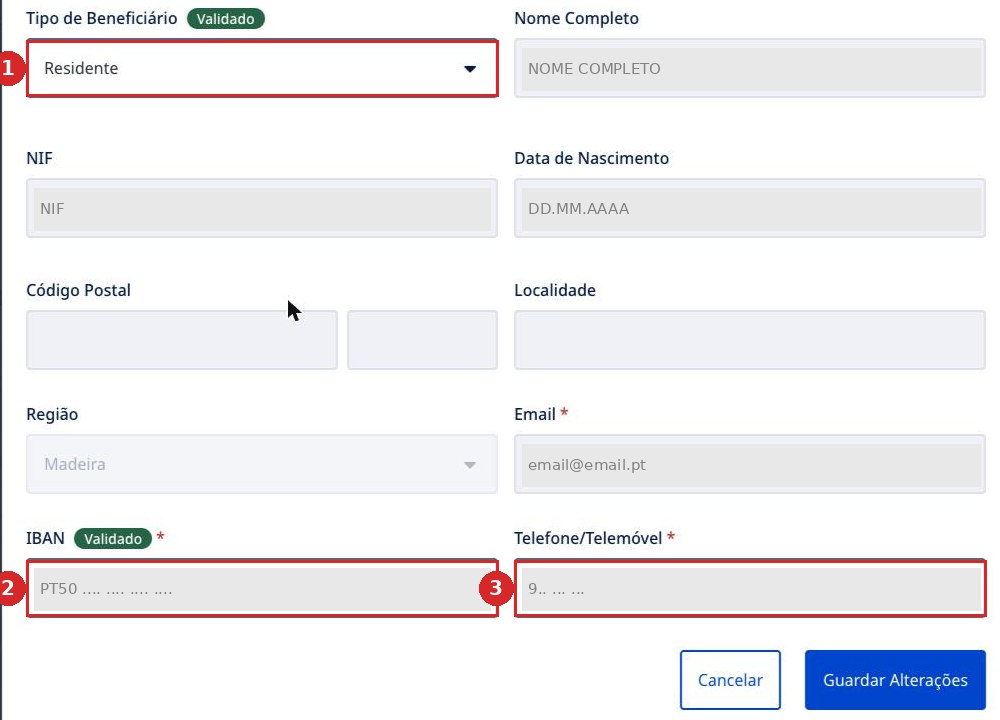
The Alterar Dados button opens a form where only three fields are editable: beneficiary type, IBAN and Telefone/Telemóvel. Name, NIF, date of birth, email, postcode and town are permanently grey.
Profile attachments
The Anexos section holds the Comprovativo do IBAN — the bank confirmation of the account. Without it, payments do not go through, and it is approved by a human operator, not the system.

Family
Situação Familiar — this is where a spouse, children and dependants are added, so that their flights go into the same claim. How this is done — Family.
Claims
Histórico de Pedidos — a list of your claims with their statuses. This is also where Correção Solicitada notices appear. What the statuses mean and how long to wait — “After submitting” in the guide.
Phone and email — your own only
The phone number and email in the profile must be your own — the same ones used to obtain Chave Móvel Digital. If you are helping someone else and enter your own contact details into their profile, access to your own account breaks. In detail — if you are filing for someone else.